
It’s a feeling many crypto owners know. You’ve got your digital assets, and you want to keep them safe. MetaMask is a popular tool for this.
But with its growing use, knowing how to protect it is key. This guide will help you understand MetaMask security. We’ll cover what to do and what to avoid.
Keeping your crypto safe should feel doable, not scary. Let’s make sure your digital wallet is as secure as possible.
MetaMask security is vital for protecting your digital assets. Focus on never sharing your seed phrase, using strong passwords, and being wary of phishing attempts. Always verify transactions and keep your software updated.
Understanding these core principles helps ensure your cryptocurrency remains safe and sound.
Understanding MetaMask Security Basics
MetaMask is a crypto wallet. It lets you use decentralized applications (dApps). It also stores your cryptocurrencies.
Think of it like your digital bank account for crypto. Because it holds real value, it can be a target. Scammers want access to your funds.
So, knowing how to keep it safe is very important. We will break down the main things you need to know. This will help you feel more confident about your digital assets.
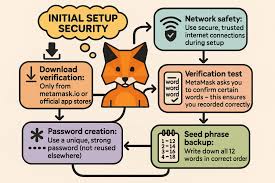
The core of MetaMask security relies on a few key pieces. First is your seed phrase. This is a list of 12 or 24 words.
It’s like a master key to your wallet. Anyone who has it can access all your funds. It’s super important to guard this phrase closely.
Never, ever share it with anyone. Not your best friend, not your mom, not even MetaMask support. They will never ask for it.
Another basic is your password. When you set up MetaMask, you create a password. This password protects the browser extension.
It stops someone from opening your wallet if they get your computer. Make this password strong and unique. Don’t use common words or easy-to-guess patterns.
A good password is like a strong lock on your door.
Keeping your wallet connected safely is also key. You often connect MetaMask to websites or dApps. This lets the app interact with your wallet.
But you must be sure the site is legit. Fake sites can try to trick you into signing bad transactions. Always double-check the website’s address.
Look for the lock icon in your browser. This shows the connection is secure.
Your Seed Phrase: The Golden Rule
Let’s talk more about your seed phrase. It’s the most critical security element for your MetaMask wallet. Sometimes called a recovery phrase or secret recovery phrase, it’s a string of words.
These words are generated when you first create your wallet. They are the master key that can restore your wallet on any device.
Think of it like this: If your phone breaks, or your computer is lost, you can get your wallet back using these words. But it also means if someone else gets these words, they can take everything. This is why never sharing your seed phrase is the number one rule.
No one from MetaMask, no exchange, no support team will ever ask you for it. If they do, it’s a scam. Immediately stop talking to them and report it if possible.
So, how should you store it? Never store it digitally. Don’t save it in a text file on your computer.
Don’t take a screenshot and save it to the cloud. Don’t email it to yourself. These places can be hacked.
The best way is to write it down. Use a pen and paper. Write it clearly.
Double-check that you wrote it down correctly.
After writing it down, store it in a safe place. A fireproof safe at home is a good option. Some people make multiple copies.
They store them in different secure locations. But be careful not to make too many. The more places it is, the more chances it has of being found.
Think about what makes sense for your security level. The key is physical, offline storage.
Seed Phrase Storage Best Practices
- Write it down: Use a pen and paper.
- Double-check: Make sure all words are correct and in order.
- Store offline: Never save it digitally.
- Secure location: Use a safe or secure place.
- Consider multiple copies: If you choose, store copies separately and securely.
- Never share: This is the most important rule.
I remember a time when a friend was in a panic. They thought they had lost their seed phrase. They had written it down but couldn’t find the paper.
For hours, they searched their house. They were imagining all their crypto gone. Luckily, they found it in an old coat pocket.
This taught them a big lesson about keeping important things in a consistent, safe spot. It was a stressful experience that could have been avoided with better organization.
Protecting Your Password and Device
Your MetaMask password is the first line of defense on your actual device. It’s what stops someone from casually opening your wallet if they use your computer or phone. It’s important to treat this password with care.
A weak password makes it easy for someone to gain access if they get physical access to your device.
What makes a strong password? It should be long. Aim for at least 12 characters.
It should include a mix of uppercase letters, lowercase letters, numbers, and symbols. Avoid using personal information. Things like your birthday, name, or pet’s name are easy to guess.
Also, don’t use common words or phrases.
Using a password manager can help. These tools create and store strong, unique passwords for you. You only need to remember one master password for the manager itself.
Then, it can generate and fill in your MetaMask password for you. This is a much safer approach than trying to remember many complex passwords or reusing them.
Your device security is also crucial. Make sure your computer or phone has a strong passcode or biometric lock. This is the very first barrier before anyone even gets to the MetaMask app.
If someone can unlock your phone easily, they can then try to access your wallet.
Keep your operating system and browser updated. Software updates often include security patches. These patches fix vulnerabilities that hackers could exploit.
If you’re running old software, you might be leaving a door open for attackers. Think of it like updating the locks on your house when the company releases better ones.
Be mindful of public Wi-Fi. Connecting to public Wi-Fi networks can be risky. They are often less secure than your home network.
A hacker on the same network could potentially intercept your data. If you must use public Wi-Fi, avoid accessing sensitive accounts like your MetaMask wallet. Using a Virtual Private Network (VPN) can add a layer of security when you’re on public networks.
Device and Password Security Checklist
- Strong, Unique Password: Use a mix of characters, numbers, and symbols.
- Password Manager: Consider using one for creating and storing passwords.
- Device Lock: Secure your computer and phone with a strong passcode or biometrics.
- Software Updates: Keep your OS and browser up to date.
- Public Wi-Fi Caution: Avoid sensitive transactions on public networks.
- VPN Use: Consider a VPN for added security on public Wi-Fi.
I once left my laptop unlocked for just a few minutes at a coffee shop. I went to grab another drink. When I came back, someone had been browsing my open tabs.
Thankfully, they didn’t try to access anything sensitive. But it was a scary reminder of how quickly things can happen. It made me much more careful about locking my device every single time.
Spotting and Avoiding Phishing Scams
Phishing scams are one of the most common ways people lose their crypto. Scammers try to trick you into giving them your sensitive information. They often pretend to be legitimate companies or people.
They might send emails, texts, or create fake websites.
One common tactic is the fake support email. You might get an email that looks like it’s from MetaMask support. It could say there’s a problem with your account.
It might ask you to click a link to “verify” your wallet or “update” your security. This link will take you to a fake website that looks just like MetaMask. If you enter your seed phrase or password there, you’ve just given it to the scammer.
Another type is the “urgent” message. Scammers might say your wallet is compromised. They’ll tell you to transfer your funds to a “safe” wallet they provide.
This is also a scam. Your funds will go straight to the scammer. MetaMask does not have a central support team that will ever tell you to move your funds for safety reasons.
They are a browser extension, not a custodial bank.
Be very suspicious of unsolicited messages. If you didn’t ask for it, and it seems too good to be true, or too urgent, it probably is. Always go directly to the official MetaMask website yourself.
Don’t click links in emails or messages to get there. Type the address manually into your browser. This ensures you are on the real site.
When you connect MetaMask to a website, it will ask for your permission. Pay close attention to these prompts. Scammers might try to get you to approve transactions that send your crypto to them.
Always read what you are approving. If it looks strange, cancel the transaction.
A good rule of thumb: If it feels wrong, it probably is. Trust your gut. If you are ever unsure about a message or a website, do not interact with it. Contact MetaMask support through their official channels if you have genuine concerns.
But remember, they won’t ask for your seed phrase or private keys.
Phishing Red Flags to Watch For
- Urgent language: “Act now!” or “Your account is at risk!”
- Requests for sensitive info: Asking for your seed phrase or private keys.
- Suspicious links: Links that don’t go to the official domain.
- Unsolicited contact: Messages you didn’t ask for.
- Too good to be true offers: Promises of free crypto or huge returns.
- Poor grammar/spelling: While not always present, it’s a common sign.
I’ve seen people fall for these scams. They are often very convincing. One person lost a significant amount because they clicked a link in what they thought was an official announcement.
The fake website looked perfect. They entered their seed phrase without thinking. By the time they realized their mistake, the money was gone.
It highlights how important it is to be constantly vigilant.
Securing Your Transactions
Every time you make a transaction with MetaMask, you’re giving it instructions. These instructions tell the blockchain what to do. They can involve sending crypto, interacting with a smart contract, or signing a message.
It’s crucial to understand and verify these transactions before you approve them.
When you initiate a transaction, MetaMask will pop up a window. This window shows you the details of the transaction. It will show you the amount of crypto being sent.
It will show you the recipient’s address. It will also show you the gas fees. Gas fees are the costs to process your transaction on the blockchain.
Always, always check these details. Is the amount correct? Is the recipient address correct?
If you are interacting with a smart contract, make sure you understand what the contract is supposed to do. Sometimes, smart contracts can have bugs or malicious code. Approving a bad contract can lead to loss of funds.
If you are sending crypto to someone, double-check their address. Copy and paste is usually best. But even then, be aware of malware that can change your clipboard.
Paste the address and then look at the first few and last few characters. Compare them to the original address you intended to send to.
For gas fees, you can often adjust them. Higher fees mean faster processing. Lower fees mean slower processing.
For most everyday transactions, the default suggested fee is fine. But be aware that sometimes these fees can spike, especially during busy network times. Don’t approve a transaction if the gas fee seems unreasonably high.
If you are signing a message, which is common for logging into dApps, read the message carefully. It will show you what you are signing. Make sure it’s just a login request and not granting permissions to spend your tokens.
I once approved a transaction to a new decentralized exchange. I was excited to try it. I didn’t look closely at the gas fee.
It was an unusually high fee. I only realized later when I saw the deduction. It was a small amount of money, but it was a good lesson in paying attention to every detail.
Now, I always take a moment to review the gas fees.
Transaction Verification Steps
- Review Amount: Ensure the crypto amount is correct.
- Check Address: Verify the recipient’s address is accurate.
- Understand Smart Contracts: If interacting, know what the contract does.
- Inspect Gas Fees: Be aware of the cost and ensure it’s reasonable.
- Verify Signatures: For message signing, read what you are agreeing to.
- Cancel if Unsure: If anything looks odd, don’t proceed.
Some people use a separate, “cold” wallet for significant amounts of crypto. This wallet is not connected to the internet. When they need to make a large transaction, they might send a small amount to a hot wallet (like MetaMask) first.
Then, they use MetaMask for the transaction. This adds an extra layer of safety. It means that if your hot wallet is compromised, only a small amount is at risk.
Advanced Security Measures
Beyond the basics, there are more advanced steps you can take to bolster your MetaMask security. These are especially important if you hold a substantial amount of cryptocurrency.
Using a hardware wallet is one of the best ways to increase security. A hardware wallet is a physical device that stores your private keys offline. It’s like an ultra-secure vault for your crypto.
You can connect a hardware wallet like Ledger or Trezor to MetaMask.
When you connect a hardware wallet, MetaMask acts as an interface. But the actual signing of transactions happens on the hardware device itself. This means your private keys never leave the hardware wallet.
So, even if your computer is infected with malware, your funds are still safe. Setting this up might seem a bit more complex at first, but it offers a huge leap in security.
Another layer of security is using multiple MetaMask accounts. Within a single MetaMask extension, you can create multiple accounts. Each account has its own public address.
Think of it like having several checking accounts. You can use one account for everyday spending, and another for larger savings. If the everyday account is compromised, your savings account remains untouched.
You can also use different MetaMask installations. For example, you might have one MetaMask on your main computer for general use. Then, you could have a separate MetaMask installation on a different device, or even a different browser profile, that you use only for high-risk activities or very valuable assets.
This creates isolation between your wallets.
Consider using a dedicated device for your crypto activities. This device would not be used for general browsing, email, or social media. It would be a “clean” machine, dedicated solely to managing your crypto.
This significantly reduces the risk of malware infections. While this isn’t practical for everyone, it’s a highly effective security measure.
Advanced Security Options
- Hardware Wallets: Connect Ledger or Trezor for offline key storage.
- Multiple Accounts: Create several accounts within MetaMask for different purposes.
- Dedicated Device: Use a separate, clean computer for crypto.
- Browser Isolation: Use different browsers or profiles for different wallets.
- Limit Permissions: Be cautious about granting extensive permissions to dApps.
I personally use a hardware wallet for the majority of my holdings. I was a bit intimidated to set it up at first. The instructions seemed a little technical.
But once I went through it, step by step, it was straightforward. Now, knowing that my private keys are stored offline gives me so much peace of mind. It’s an investment in security that I highly recommend for anyone serious about crypto.
Real-World Scenarios and What They Mean
Let’s look at some common situations and how they relate to MetaMask security. Understanding these can help you react correctly and protect yourself.
Scenario 1: You See a Pop-Up Saying Your Account is Locked
This is almost always a scam. MetaMask doesn’t lock accounts and ask you to unlock them by providing your seed phrase. If you see this, close the pop-up immediately.
Do not click any links or enter any information. Go to the official MetaMask website directly if you have concerns about your account.
Scenario 2: A Friend Asks You to Send Them Some Crypto
Even if it’s a friend, be cautious. Their account could be compromised. Or, they might be trying to set up a scam themselves.
If it’s a genuine request, confirm it through another communication channel, like a phone call. Never send crypto based solely on a message that appears to be from a friend, especially if it’s unexpected.
Scenario 3: You Downloaded a New DeFi App
Before connecting MetaMask, do your research. Read reviews. Check the project’s official website and social media.
Understand what permissions the app is asking for. If it seems too new or has very little information, it might be risky. Connect with caution and only approve necessary transactions.
Scenario 4: You Accidentally Sent Crypto to the Wrong Address
Unfortunately, if the transaction has been confirmed on the blockchain, it’s usually irreversible. This is why double-checking addresses is so critical. There’s very little you can do to get it back.
This is a painful lesson, but it reinforces the need for careful transaction verification.
Scenario 5: Your Computer Feels Slow or Acts Weird
This could be a sign of malware. If you suspect your computer is infected, do not access your MetaMask wallet. Disconnect from the internet if possible.
Run a full antivirus scan. If you can’t be sure your computer is clean, consider using a different, secure device to access your wallet or restore it using your seed phrase on a trusted device.
Common Security Mishaps & What to Do
- Locked Account Pop-up: SCAM. Close immediately.
- Friend’s Crypto Request: Verify via another channel.
- New DeFi App: Research thoroughly. Connect with caution.
- Wrong Address: Usually irreversible. Double-check next time.
- Slow/Weird Computer: Malware possible. Avoid wallet access. Scan device.
The crypto world moves fast. New dApps and opportunities pop up all the time. It’s easy to get excited and rush into things.
But taking a pause to assess the security of any new platform or interaction is always worth it. The few extra minutes you spend can save you from potentially losing a lot.
When to Be Concerned and What to Check
Most of the time, if you follow the basic security steps, your MetaMask wallet will be safe. But it’s good to know when something might be wrong. This helps you react quickly if there’s an issue.
Signs of a potential compromise:
- Unexplained Transactions: If you see transactions in your wallet history that you didn’t make, this is a major red flag. This could mean your seed phrase or private keys have been compromised.
- Balance Changes Suddenly: If your crypto balance drops without you initiating any transfers, something is wrong.
- MetaMask Prompts You to Re-enter Seed Phrase: Legitimate MetaMask will NEVER ask for your seed phrase after initial setup. If it does, it’s a scam.
- Unusual Network Activity: If your computer or phone is suddenly using a lot of internet data without you doing much, it could indicate malware.
- Being Locked Out of Your Wallet (without reason): If you can’t access your wallet and you know your password is correct, but it’s not letting you in, it might be a sign of an issue, though this is rare for MetaMask itself.
What to check if you suspect a problem:
- Check Transaction History: Go to a blockchain explorer (like Etherscan for Ethereum) and look up your public address. See if the transactions match what you expect.
- Review Connected Sites: In MetaMask, go to Settings > Connected Sites. Disconnect any sites you don’t recognize or no longer use.
- Scan Your Device: Run a full antivirus and anti-malware scan on all devices where you use MetaMask.
- Change Your Password: If you suspect a device compromise, change your MetaMask password and your device’s login password.
- Consider Restoring Your Wallet: If you believe your seed phrase may have been exposed, the safest (though drastic) action is to create a brand new wallet on a trusted device and transfer all your funds to it. Use your seed phrase only once to set up this new wallet.
It’s important to stay calm if you think something is wrong. Panicking can lead to mistakes. Take a deep breath.
Systematically check the points above. Early detection is key to minimizing potential losses.
When to Be Alert
- Unexpected Balance Drop: Your crypto is disappearing.
- Unrecognized Transactions: Activity you didn’t authorize.
- Suspicious Prompts: MetaMask asking for your secret words.
- Device Oddities: Slowdowns, strange pop-ups, high data usage.
I had a situation once where a new token I interacted with seemed to disappear from my wallet balance. I panicked for a moment. But when I checked Etherscan, the tokens were still there, just not showing up in MetaMask.
It turned out to be a display bug in the wallet interface. This taught me to always cross-reference with the blockchain explorer if something looks off.
Quick Security Tips and Best Practices
Let’s wrap up with some straightforward tips. These are easy to remember and apply. They form the foundation of good MetaMask security.
- Never Share Your Seed Phrase: This is the most critical rule. Treat it like the keys to your entire crypto fortune.
- Use a Strong, Unique Password: For your MetaMask wallet and your device.
- Keep Software Updated: Always update MetaMask, your browser, and your operating system.
- Be Wary of Links: Only click links from trusted sources. Go directly to websites by typing the URL.
- Review Transactions Carefully: Understand what you are approving before you click “Confirm.”
- Disconnect Unused Sites: Regularly check and remove connected websites you no longer use.
- Use a Hardware Wallet: For significant amounts of crypto, this is a strong recommendation.
- Enable Biometrics/Passcodes: Secure your mobile device and computer.
- Don’t Click on Random Ads: Especially if they promise free crypto or easy money.
- If it Feels Too Good to Be True, It Probably Is: This applies to many online interactions, especially in crypto.
These tips aren’t complicated. They just require a bit of consistent attention. By making them a habit, you significantly reduce your risk of falling victim to common crypto scams.
Your MetaMask Security Action Plan
- Daily Habit: Check connected sites.
- Weekly Habit: Ensure software is updated.
- Monthly Habit: Review transaction history on a block explorer.
- As Needed: Never share seed phrase. Always verify transactions.
I try to think of my crypto wallet like my physical wallet. I don’t leave it on a park bench. I don’t give my debit card number to strangers.
I’m careful about where I use it. Applying similar common sense to my digital wallet makes a big difference. It’s about building good habits that protect your digital wealth.
Frequently Asked Questions About MetaMask Security
Is MetaMask safe to use?
MetaMask itself is a secure tool. It is open-source, meaning its code is available for review. However, its safety depends heavily on how you use it.
Following best practices for security, like protecting your seed phrase and being wary of scams, is crucial for keeping your funds safe.
What should I do if I think I shared my seed phrase?
If you believe your seed phrase has been compromised, act immediately. The safest course of action is to create a brand new MetaMask wallet on a trusted device. Then, transfer all your funds from the compromised wallet to this new wallet.
Use your seed phrase only once to set up the new wallet. Do not use the old wallet anymore.
Can MetaMask support access my wallet?
No. MetaMask is a non-custodial wallet. This means they do not have access to your private keys or seed phrase.
They cannot access your wallet or your funds. If anyone claiming to be from MetaMask support asks for your seed phrase or private keys, it is a scam.
How often should I change my MetaMask password?
MetaMask passwords are tied to your browser session. You usually only need to re-enter your password after a period of inactivity or if you close your browser. You don’t need to change it regularly like a website password.
However, if you suspect your device has been compromised, change it immediately.
What is the difference between a seed phrase and a private key?
Your seed phrase is a list of 12 or 24 words that can generate all your private keys for all the accounts in your wallet. A private key is a long string of characters that directly controls a specific account and its assets. The seed phrase is the master key to all your private keys.
Losing your seed phrase means you lose access to all your accounts. If someone gets your seed phrase, they get access to everything.
Can I use MetaMask on multiple devices?
Yes, you can use MetaMask on multiple devices. To do this, you’ll need to install the MetaMask extension on each device. Then, when setting it up on a new device, choose the option to “Import using Secret Recovery Phrase” and enter your 12 or 24-word seed phrase.
Remember that this means your seed phrase is now accessible on more devices, so ensure all of them are secure.
Conclusion
Keeping your MetaMask secure is an ongoing process. It involves understanding the risks and taking proactive steps. By guarding your seed phrase, using strong passwords, and staying alert to scams, you build a strong defense.
Remember, your crypto assets are valuable. Treat their security with the importance it deserves. Stay informed, stay cautious, and happy secure browsing!